Kotlin
Toadkeep II
Keyboard prosthesis: mark dead physical keys, then chord their row-neighbors to type the missing character. Kotlin/JavaFX, JNativeHook + xdotool, ABNT2, Linux/X11.
Up nextFleur De Lys
Work
Web projects, software, and case studies I have built.
Mirror to the RISC-V instruction reference available on LYSZT.
Meili (美丽) is a software that allows you to translate Chinese live, with a transparent overlay with pinyin and meaning.
Arduino pomodoro clock with timers.
A curated, multilingual list of RISC-V resources for learners and developers.
A text RPG played from psql, with the game rules implemented as PostgreSQL triggers and plpgsql functions.
Alisa v Zadzerkalli - a Discord bot written in C++
Refactored Providentia Network.
Social simulation and story generator that creates sci-fi narratives based on Star Trek. OOP Python/Flask with some data structures, Gemini API, React/Vite/Tailwind frontend.
The Elixir version of the Clairemont bot from Discord, powered by the Providence Network (Providentia).
Weird mock of a console system made with Arduino/ESP8266
Keyboard prosthesis: mark dead physical keys, then chord their row-neighbors to type the missing character. Kotlin/JavaFX, JNativeHook + xdotool, ABNT2, Linux/X11.
Github Pages Dev Diary and documentation for my projects.
Project for Computer Organization (Organização de Computadores). Undertale-like Assembly Risc-V RPG battle simulator.
RPG Adventure written in RISC-V Assembly
Providence is a Discord bot designed to analyze user messages, manage user data, and enhance engagement through language translation and sentiment analysis.
.config Linux configuration manager built in C++.
Providentia's Password and Authentication Manager.
Sequel to a java society simulator made during a Java class, but in Python
The Scarlett Citadel. The remade version of my personal website compiled using vite into a static website. Switched for Tesserae, in fact.
Computes definite integrals of single-variable functions with Simpson’s 1/3 rule.
Second probability homework made in C and WebAssembly
Creates extendible hashing in C to learn the content the most painful way possible
Repositorio en el que estudio sistemas operativos exclusivamente en español y creo herramientas y demostraciones documentadas en Latex.
Esta atividade consiste em ler arquivos de metadados e dados para simular um select * from table. Para tal, serão fornecidos três arquivos: um contendo o metadado da tabela (table.dic), outro o metadado dos atributos (att.dic) e um outro com os dados de uma das tabelas presentes no table.dic (11.dat).
Probability discipline work that asks to apply the binomial formula.
Follows the Bare Bones OsDev tutorial from https://wiki.osdev.org/Bare_Bones to create a minimal kernel to learn OS
Integrative project for the courses Programming 2, Databases, and Software Engineering. Tool for marketing process integration and automation.
Revisiting electronics concepts and trying to make a processor. A study repository. The goal is to learn PCB design and digital circuits. Verilog, Arduino, ESP32 and Raspberry PI.
Academic project for Data Structures II. Benchmarks five sorting algorithms in C across multiple input sizes, then generates performance charts via Python/matplotlib.
Workonomia is an economic management simulator developed in Java using the Swing library, focused on resource management and system optimization.
Portfolio
Complete README documentation for all LYSZT projects, rendered inline below the directory.
Eris is a developer CLI that wraps your git workflow with a structured commit flow, project-local macros, and a Prolog-powered command router that supports chaining and negation.
You run eris instead of raw git for day-to-day work.
eris init [name] — sets up an .eris/ directory in the current folder, writes the macros file, and adds .eris/ to git's local exclude so it never shows up in your repo.
eris commit / eris copush — interactive commit + push in one shot. Prompts you to pick a conventional commit type (feat, fix, refactor, etc.) from a menu, then asks for a message, formats it as type: message, stages everything, commits, and pushes. Works from anywhere inside the project.
eris ignore <file> — adds a file to .eris/.eris.ignore so it's skipped during copush. Per-project, not global.
eris alias add <name> do <cmd> do <cmd> — saves a named macro (sequence of shell commands) to .eris/.eris.macros.
eris alias run <name> / eris run <name> — runs a saved macro.
eris rebuild — rebuilds the eris binary itself using CMake.
eris root — prints the detected eris project root.
The command router is written in Prolog. It supports &&, ||, and not directly in the argument list:
eris init myapp && eris commit      # commit only if init succeeded
eris init || true                   # ignore failure
eris not init                       # succeed when init fails
Macros are stored in .eris/.eris.macros at the project root:
[deploy]
make build
git push origin main
ssh prod "systemctl restart app"
Add with do separator (no quoting needed):
eris alias add deploy do make build do git push origin main
Add with quotes (for commands that contain semicolons or shell syntax):
eris alias add test "npm run lint" "npm test"
Run:
eris run deploy
make
This builds the binary and symlinks it into ~/.local/bin/eris (override with LINK_DIR=...), so eris works immediately without sudo. For a system-wide install instead:
sudo make install
This builds the binary, installs it (plus its Prolog router files) to /usr/local/lib/eris/, and symlinks /usr/local/bin/eris to it. No shell alias is needed as long as /usr/local/bin is on your PATH. To install without root, use a user prefix:
make install PREFIX=$HOME/.local # binary lands in ~/.local/bin
Dependencies (cmake, gcc, libcurl, libssl, etc.) are checked and installed automatically during build if missing.
make        # configure + build (Debug)
make CONFIG=Release
make JOBS=8
Requires: cmake, gcc/g++, libcurl-dev, libssl-dev, pkg-config.
Optional: SWI-Prolog (libswipl-dev) for the Prolog router — falls back to a C router if not present.
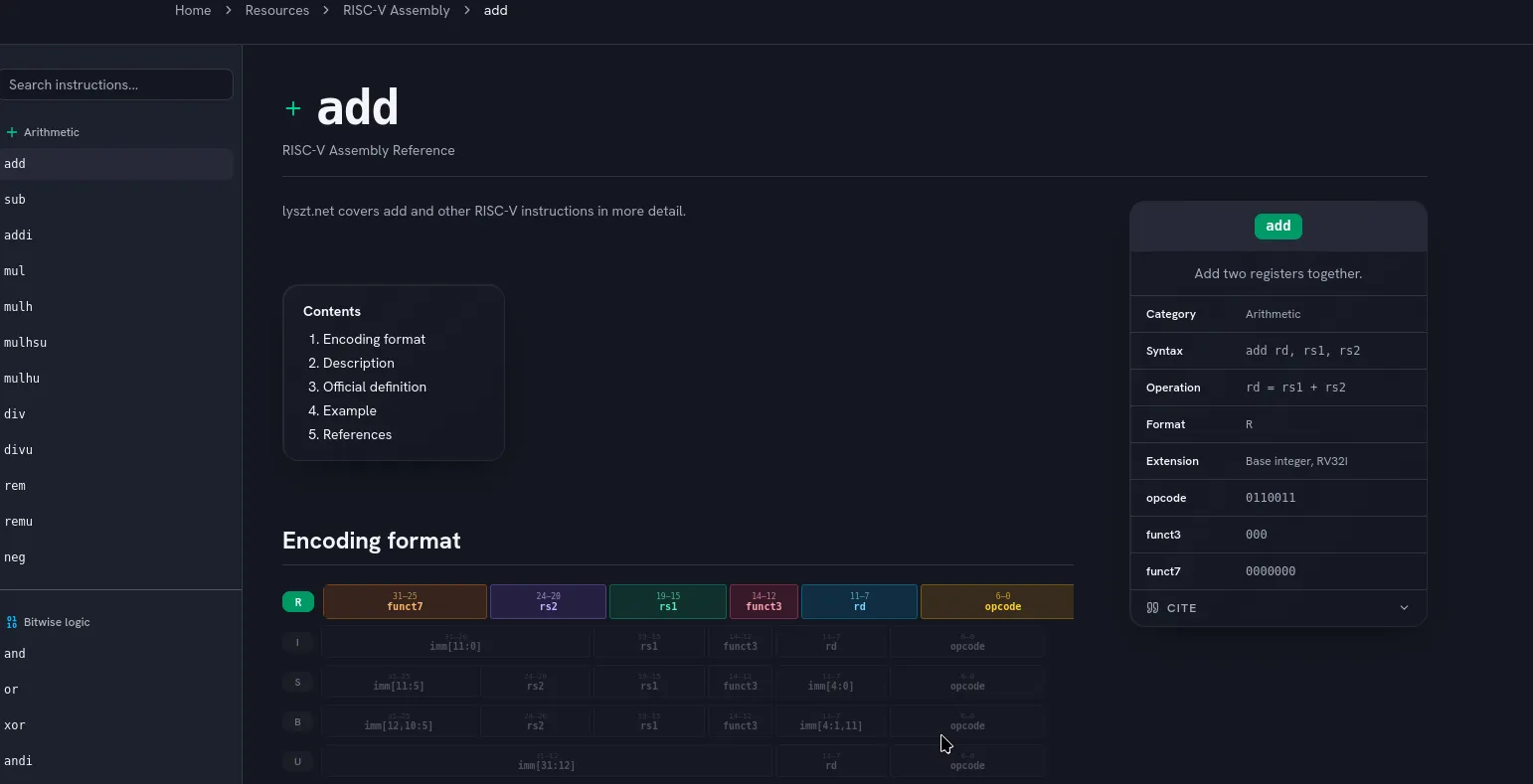
Open mirror of the LYSZT RISC-V instruction reference, rendered at
lyszt.net.
This is documentation of the RISC-V instruction set written for people who are
learning assembly, with the purpose of explaining clearly what the
instruction does, in a readable manner.
LYSZT aims to make RISC-V documentation easier to learn from and navigate. The
official instruction set manual is the authoritative source for architectural
definitions, but its technical presentation can be difficult to approach when
learning assembly for the first time.
These references provide an additional layer of explanation for each
instruction, and the output is translated to many languages so the non-english speaking public can read it and learn.
They are intended to help readers understand what an instruction does, how it operates on registers
and memory, and how its encoding relates to its behavior.
The official definitions remain available alongside the explanations, allowing
readers to compare the descriptions with the architectural specification and
use the references as a starting point for further study.
reference/ - one page per instruction: curated description, the officialApache License 2.0 for the content of this repository. Official definition
sections quote the RISC-V Instruction Set Manual, (c) RISC-V International,
and remain under CC BY 4.0
Found an error, or an explanation that could be clearer? Open an issue or a
pull request.
Readability comes before everything else, no matter who or what wrote the
text. A description is ready when a beginner can picture the instruction
after one reading, and anything that needs a second pass is not. Padding,
decoration and repetition are turned away, whatever their source.
美丽 (Meili) means "beautiful".

A desktop overlay for reading, translating, and studying Chinese.
Meili is a desktop application for Chinese text recognition, translation, and pronunciation support. It uses a transparent overlay to display recognized Chinese text alongside pinyin, vocabulary definitions, and English translations.
Meili can recognize subtitles from video playback, extract text from selected screen regions, and process text displayed in other desktop applications. It also includes audio recognition and text-to-speech functionality.
Processing runs locally on your machine.
Meili can monitor a selected window and recognize subtitles within a user-defined screen region. Recognized text is displayed in the overlay with pinyin, vocabulary breakdowns, and translations.
Live mode also uses audio recognition to help identify spoken dialogue and correct subtitle recognition. Clicking the overlay background toggles playback of the selected media.
Each recognized line includes the original Chinese characters, pinyin with tone marks, individual word meanings, and an English translation. This provides both a translation of the complete sentence and information about its vocabulary.
Meili can recognize and translate Chinese text from other applications through screen selection or capture. Select a region of text to process it directly, or press Ctrl+Alt+S to capture the screen and extract any Chinese text it contains.
Meili can read recognized Chinese text and English translations aloud, providing audio alongside the displayed text.
An optional browser extension allows you to select Chinese text on webpages and view its translation directly within the page.
Meili requires Linux (tested on Wayland) and Python 3.12 or later. Node.js is only needed to build the optional browser extension. Chinese and English OCR language data are included in the repository. The extension requires a Chromium-based browser.
# Install system dependencies (Arch Linux)
./scripts/install_dependencies.sh

# Install Python dependencies
make install-pip

# Build the browser extension (optional)
make build-extension

# Create your local configuration
cp config/example_config.yaml config/config.yaml

# Run Meili
make run
To install the browser extension, navigate to chrome://extensions, enable Developer Mode, select Load unpacked, and choose src/extension/dist.
Meili uses default settings on first launch. Additional options, including language preferences, models, and GPU utilization, can be configured in config/config.yaml.
Contributions are welcome. Issues and pull requests can be submitted through the repository. See AGENTS.md for development notes.
A physical pomodoro timer.
A curated list of RISC-V resources for students, educators and hardware developers.
Read this list on lyszt.net in your language.
English | Français | Português | Deutsch | Italiano | Español | Polski | Русский | Українська | 日本語 | 한국어 | 简体中文 | العربية | हिन्दी
Suggestions are welcome through issues and pull requests. Add one link per pull request, place it in the matching section and describe it in one sentence.
This list started from the following lists, whose entries were merged, checked and reorganized.

This list is licensed under Creative Commons Attribution-ShareAlike 4.0. Copies and adaptations must credit Awesome RISC-V and be released under the same license.
A text RPG for psql where players create a character with an INSERT and a trigger narrates the intro. The game rules are written in plpgsql and the schema is versioned with Flyway migrations.
The game is a PostgreSQL schema that players use from psql. Their SQL statements advance the story, and the database answers with notices.
make setup   # starts Postgres 17 and runs the Flyway migrations
make run     # opens psql as the rpg user
Players then read the available races and classes and insert a character.
SELECT * FROM races;
SELECT * FROM classes;

INSERT INTO character_info (name, description, class, race, gender)
VALUES ('Aria', 'Uma maga curiosa', 2, 1, 'feminino');
Players who want a ready character can copy one from the templates. The use_template function takes a template id and inserts that character into character_info.
SELECT * FROM char_templates;
SELECT use_template(1);
The project is a way to practice PostgreSQL. It uses triggers, event triggers, roles and permissions, enums, composite types and set returning functions.
The code is licensed under the Apache License 2.0, and the LICENSE file has the full text. That license covers the code and nothing else.
The story is a separate work. This means the world of Nexus, its nations, characters, history and lore, and all narrative text in the game such as the printed messages and faction descriptions. The story is Copyright (c) 2014-2026 lyszt, all rights reserved. You can read it and play the game, but you can't copy, adapt or publish the story without written permission. The NOTICE file repeats this rule for anyone who redistributes the code.

Alisa v Zadzerkalli (Ukrainian) - Alice Through the Looking-Glass. The world
on the far side of the mirror, where you go on purpose and everything is
reflected, backwards, and wrong.
«Ніколи не вгадаєш, ким станеш за хвилину.»
"You can never guess who you'll become in a minute." - Alice, in the
Аліса в Країні Див, trans. Valentyn Korniienko, ed. Ivan Malkovych p. 53.
A Discord bot written in C++.
Mention her, or say alisa or obliterator in a message, and she answers. The
reply is not generated locally. Alisa assembles the context and Providence
does the thinking.
What she puts in front of the model on every message:
That context is what lets her answer questions nobody wrote a command for.
Who is in the top three, what problems they have in common, who has gone
quiet. The model supplies the reasoning, the scrape supplies the facts.
Member state is pulled from vjudge at startup by a bounded pool of eight
workers, each holding one connection for its share of the group. Every member
costs two requests, the profile page for counts and rank, and the solve detail
endpoint for the problem list.
The message handler wakes on every message in every channel the bot can see.
It drops bots, drops anything that does not mention her by ping or by the words
alisa or obliterator, and right now it also drops every author but one, an id
hardcoded in src/onmessage. Whatever survives gets an immediate embed reading
Thinking..., posted before the model is asked anything, so the channel sees her
take the question even when the answer is slow.
The answer itself is a POST to Providence at http://127.0.0.1:8931 on
/speech/deepthink/, carrying the message, the whole club context, and the
Discord username as the caller identity. It waits up to 200 seconds. The reply
is trimmed to 1990 bytes on a UTF-8 character boundary so a cut never lands
mid-codepoint, and then the placeholder embed is edited in place. A timeout, a
refusal or an unparseable body all end as text in the same embed rather than
silence.
Providence is a separate service and is not in this repository. Without it
running on that port the bot still starts, still answers slash commands, and
still scrapes the club, it only stops thinking.
Alisa sends light true, which is the cheap path, one reasoning node and no
branching. Drop that flag and the same endpoint runs a bounded tree of thoughts
instead, depth two, at least two labelled branches per node, each one scored for
probability of success and for how much potential it adds or destroys, and each
node generated by a native thinker spawned as a subprocess. That machinery is
sitting there unused on every message she sends.
It also decides for itself whether the question needs more than talk. If it
does, a classifier maps the message to one command and its argument, runs it,
and folds the result into the final answer. What is on that list right now:
Every one of those answers carries structured fields beside the prose. A plot or
a LaTeX render comes back as a base64 PNG under image, a portal read comes back
as JSON under data, and the model's own commentary sits alongside under
response. Alisa reads response and throws the rest away, so today a question
that produces a graph reaches Discord as a sentence about a graph nobody can
see. Sending the image as an attachment is the obvious next thing this bot
should learn.
Access is per caller, not per bot. She identifies herself as discord and the
author's username, and Providence looks that pair up and refuses anyone it does
not know, which is the refusal she prints verbatim. Adding a club member means
adding them there, not here.
Needs a C++20 compiler, CMake 3.16 or newer, and three libraries, DPP for the
gateway, cpr for HTTP, lexbor for HTML. On Arch the Makefile installs whichever
are missing through yay or paru. Anywhere else, install them yourself first.
make deps      fetch DPP, cpr and lexbor if absent
make           configure and build into build/
make run       load .env, then run the binary
make rebuild   wipe build/ and start over
Two things in the build are deliberate. The default build type is
RelWithDebInfo, and parallel compile jobs are capped at two. DPP's headers are
template-heavy enough that an unoptimised build costs several gigabytes per
compiler process, and one process per core will take the machine down with it.
Give it more when you have the memory, make JOBS=8.
Sources are globbed with CONFIGURE_DEPENDS, so a new file under src/ is picked
up on the next build without touching CMakeLists.
The bot reads DISCORD_TOKEN from the environment and nothing else. Put it in
.env at the repository root and make run will export it for you, or export it
yourself and run build/alisa-v-zadzerkalli_core directly. She connects with the
default intents plus message content, which is a privileged intent, so enable
it on the application in the Discord developer portal or the message handler
will only ever see empty strings.
Providence keys live alongside it in .env for the service on the other end of
the socket. This binary never reads them.
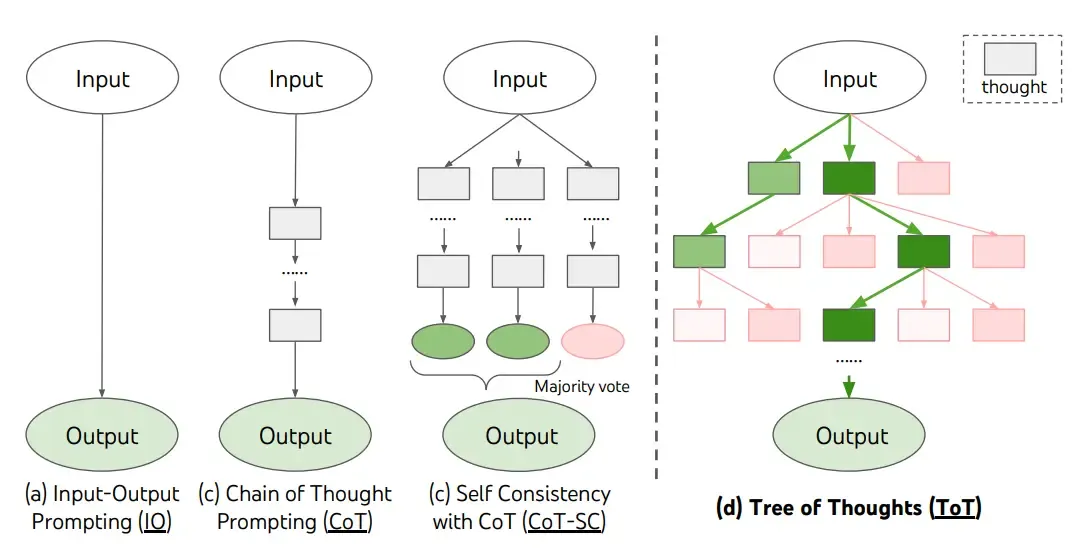
Providentia Network is a Django-based backend that orchestrates multi-branch reasoning with Google's Gemini models, a native C++ co-processor, and optional visualisations of the thought graph. This document summarises the current architecture and provides the commands needed to build and run the system locally.
https://www.promptingguide.ai/techniques/tot
 Yao et el. (2023) and Long (2023)

recently proposed Tree of Thoughts (ToT), a framework that generalizes over chain-of-thought prompting and encourages exploration over thoughts that serve as intermediate steps for general problem solving with language models.

ToT maintains a tree of thoughts, where thoughts represent coherent language sequences that serve as intermediate steps toward solving a problem. This approach enables an LM to self-evaluate the progress through intermediate thoughts made towards solving a problem through a deliberate reasoning process. The LM's ability to generate and evaluate thoughts is then combined with search algorithms (e.g., breadth-first search and depth-first search) to enable systematic exploration of thoughts with lookahead and backtracking.
Client -> /speech/simple_response (Django REST view)
      -> Python ThinkingManager (speech/context_manager/ThinkingManager.py)
      -> C++ “Kievan Rus” thinker (speech/context_manager/Kievan Rus/*.cpp)
      -> Gemini API (JSON over HTTPS)
      -> Binary payload (status + context + summary)
      -> Python deserialiser & branch expansion
      -> Optional PNG graph (speech/context_manager/graphs/)
      -> Django response text
Django REST Endpoint (speech/views.py)
Accepts a user prompt, instantiates a ThinkingManager, and forwards the final instruction text returned by the agent.
Python Thinking Manager (speech/context_manager/ThinkingManager.py)
Maintains the thought tree and enforces architectural rules:
ContextStruct (Pydantic).probability_of_success, incremental potential_score, possible_setbacks, and branch labels.C++ “Kievan Rus” Thinker (speech/context_manager/Kievan Rus/)
Modularised into headers/sources for argument parsing, environment loading, Gemini HTTP calls (libcurl), prompt construction, and binary serialisation.
.env.build-thinker recompiles the module (g++17, -lcurl) and is chained automatically when running the server.Graph Rendering (plotting/graphing.py)
Uses Matplotlib (Agg backend) to visualise the final thought tree. Each node includes branch label, wrapped plan text, probabilities, per-step potential deltas, cumulative potential, and highlights for “final” or “regretted” states. Images land in speech/context_manager/graphs/.
Gemini Agent (speech/gemini/agent.py)
Lightweight wrapper around Google’s genai client. The C++ module mirrors this functionality for latency-critical reasoning.
ThinkingManager keeps the tree depth bounded (max_iterations = 8) yet ensures every node spawns at least two labelled branches (e.g., Primary-A, Primary-B) unless capped by the iteration limit.probability_of_success — float clamped to [0.0, 1.0].potential_score — signed delta added to cumulative_potential.possible_setbacks — textual risk assessment embedded into logs, console output, and visualisations.g++ with C++17 support and development headers for libcurl.GEMINI_API_KEY) placed in .env or the process environment.make update # uses environment.yml via conda/micromamba
Override defaults:
make update CONDA_ENV=my-env-name
make update ENV_FILE=envs/dev.yml
make update CONDA=~/.local/bin/micromamba
make run # recompiles the C++ thinker then runs `python manage.py runserver`
Standalone compilation (if needed):
make build-thinker # cd speech/context_manager/Kievan\ Rus && g++ ... -lcurl
The server expects .env at the project root unless KIEVAN_RUS_ENV_PATH is set.
| Target | Description |
|---|---|
make run |
Build C++ helper and start Django dev server |
make migrate |
Run migrations (makemigrations + migrate) |
make prepare |
Create Conda env from environment.yml |
make update |
Update/create Conda env with pruning |
make build-thinker |
Recompile the C++ reasoning module |
make help |
List available targets (if defined in Makefile) |
Use PY=... to point at a specific interpreter, or override DJANGO_SETTINGS_MODULE as needed.
.env
GEMINI_API_KEY=your-key
# optional Django settings...
KIEVAN_RUS_ENV_PATH (environment variable) can override the .env location for the C++ process.
Graphs are written to speech/context_manager/graphs/thought_graph_<root-id>.png. Remove the directory to clean up artefacts.
text fields) raise clear exceptions logged by both Python and C++ layers.[ThinkingManager] prefixes. Watch the Django console during development to track the reasoning flow.speech/
├── context_manager/
│ ├── ThinkingManager.py # Python orchestrator
│ └── Kievan Rus/ # C++ native thinker (modularised sources)
├── gemini/
│ └── agent.py # Python Gemini client wrapper
plotting/
├── graphing.py # Matplotlib renderer for thought trees
README.md
Makefile
Providentia Network’s backend is designed for iterative experimentation: update the prompts, adjust scoring heuristics, or extend the binary format as needed. make run keeps the C++ helper in sync so you can focus on the reasoning logic. Happy hacking!
FS Madame de Pompadour is a text-based narrative simulator that creates dynamic and unpredictable stories set in a sci-fi universe. By clicking "Next," you advance the simulation one turn at a time, watching as a cast of characters interact with each other based on a combination of predefined behaviors and generative AI.
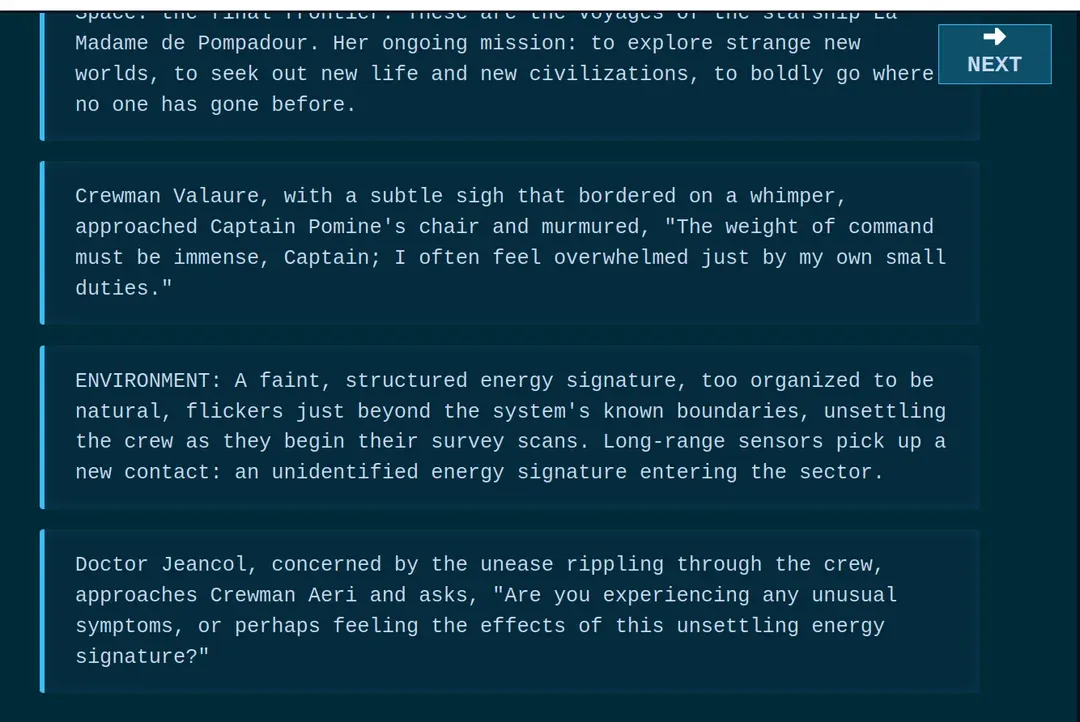
The goal is to create a "digital terrarium" where complex social dynamics and unexpected events emerge from simple rules and the creative power of AI.
Welcome to FS Madame de Pompadour.

Captain Pepillo turned to Crewman Harold and barked, "Report on the disciplinary actions taken against Von."

Captain Pepillo turned towards the comms station and demanded, "Get me Lieutenant Dubois immediately."

Tedrick leaned towards Crewman Waylon and whispered, "Did you see what Von did? Seems like Captain Pepillo is in a mood today," while subtly adjusting his uniform to appear presentable.

Konstantin quickly glances at Crewman Harold, then quietly mutters to Crewman Mohammed, "I wonder what Von did to get on the Captain's bad side this time," as he discreetly polishes a section of the nearby railing.

Crewman Von nervously straightens his uniform, then, catching Crewman Ezechiel's eye, mutters under his breath, "This is going to be a long day," hoping Ezechiel will respond.

Crewman Mohammed, noticing Konstantin's discreet polishing, glances at the railing and says, "Looks like it needs a good scrub, eh? Perhaps we should do this section together, Konstantin?"

Crewman Harold, noting the tense atmosphere and the Captain's orders, casually adjusted his own uniform and muttered to Crewman Sebastien, "Looks like Von's in the hot seat, eh? Think we should go get a coffee to lighten the mood before duties get more unpleasant?"

Seeing the tension, Crewman Westley turns to Crewman Flin and asks, "Did you hear what happened with Von? Seems like the Captain is in a mood, perhaps we should make sure our stations are spotless."

Captain Pepillo asks for their professional opinion Crewman Harold.

Captain Pepillo turns to Crewman Von and demands, "Von, report to me immediately on your current station and systems status."

Crewman Westley, noticing the Captain's stern command to Von, quickly turns to Crewman Flin and quietly says, "Flin, let's check the supply lockers, I think the Captain might want the emergency rations inventoried," hoping to appear busy and avoid any unwanted attention.

Crewman Mohammed, seeing the tension around Captain Pepillo, quietly approached Crewman Ezechiel and whispered, "Do you think we should get some cleaning supplies ready, just in case the Captain needs something done quickly?"
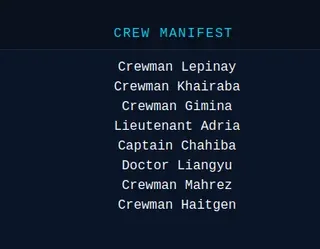
In this demonstration snapshot from the FS Madame de Pompadour simulation, we observe a complex and dynamic social ecosystem in motion. The system showcases its capacity for generating emergent narrative not through pre-scripted events, but by allowing independent agents to interact, creating a rich and believable tapestry of life on the lower decks.
The simulation ignites with a clear catalyst: a high-ranking authority figure, Captain Pepillo, introducing immediate, high-stakes tension through direct orders. This "command cascade" becomes the central gravitational point for the entire social ecosystem. Notice how his demands don't just trigger individual character scripts, but instead initiate a unified, high-pressure event. This showcases the system's new focus on hierarchical structure, where the actions of a single agent can dictate the focus, mood, and strategic objective for every other character in the shared environment.
As the Captain's orders ripple through the crew, we see the emergence of sophisticated, reactive social strategies. The crewmembers don't just continue with idle tasks; they immediately begin processing the new reality. Watch as characters like Tedrick and Konstantin form temporary conversational pods to gossip and analyze the situation, attempting to make sense of the new power dynamic. More impressively, Crewman Westley demonstrates a higher level of emergent logic by actively formulating a survival strategy—suggesting he and a crewmate appear busy with official tasks to avoid the Captain's wrath. This is not a pre-scripted behavior, but a logical social conclusion generated by the AI in response to a perceived threat, demonstrating a robust capacity for risk assessment.
This brief window reveals a powerful engine for emergent storytelling that seamlessly blends professional roles with personal anxiety. We see Crewman Harold forced to switch from casual, hushed conversation to giving a formal, professional opinion on the Captain's demand, illustrating the system's ability to manage conflicting social contexts. The entire simulation revolves around the central conflict with Von, creating a unified narrative pressure cooker rather than a collection of separate, quiet dramas. The engine has matured beyond generating a simple tapestry of life, now demonstrating the power to simulate a complex web of social calculation, strategic alliances, and emergent group thinking under duress.
FS Madame de Pompadour is built on a modern, decoupled web architecture, separating the backend simulation engine from the frontend user interface for modularity and performance.
The entire simulation core and logic resides in the Python backend.
Crewman and ActorManager classes that are easy to extend.The user interface is a fast, modern single-page application (SPA).
The flow of a single turn is simple and effective:
fetch request to the backend's /action endpoint running on Flask.ActorManager, which runs a single turn of the simulation, potentially calling the Gemini API.
Ryujin is the diplomatic liaison module for the Clairemont bot. While other modules in the system handle security and administration, Ryujin's focus is on cultivating allied relationships, coordinating joint initiatives, and maintaining calm in inter-guild channels. It is built on Elixir with Nostrum and designed to extend into Rust-backed features for high-performance tasks.
native/ryujin crate for Rustler NIFs to handle compute-heavy tasks.install.sh and run.sh scripts manage the toolchain and environment for repeatable setups.postgres/postgres on localhost)curl and tar (for the FFmpeg download)Ensure the helper scripts are executable before starting:
chmod +x install.sh run.sh
Configuration is loaded from envs/. The runtime merges envs/.env (shared defaults) and an environment-specific file like envs/dev.env.
At minimum, you must define your Discord token in envs/.env:
DISCORD_TOKEN=YOUR_DISCORD_TOKEN
The runtime scripts automatically add the local vendor/bin and Python virtualenv to your PATH.
The installer fetches Mix dependencies and stages the required media binaries locally in the vendor/ directory:
./install.sh
This script will:
Launch the bot for development using the run script:
./run.sh
The script verifies that all tools (ffmpeg, yt-dlp, etc.) are present, runs database migrations, and starts the Phoenix application via iex -S mix.
The project includes a migration to enable the Apache AGE extension for graph queries. After installing AGE on your PostgreSQL server, the run.sh script or mix ecto.setup will enable it in the database.
You can then issue Cypher queries through Ecto.Repo.query/2:
Repo.query!("""
SELECT *
FROM cypher('ryujin_graph', $$
MATCH (n) RETURN n
$$) AS (node ag_catalog.agtype);
""")
The native/ryujin crate is integrated with Rustler. Elixir and Rust code is compiled together with mix compile. Add new NIFs in src/lib.rs and expose them to Elixir through the lib/ryujin.ex module.
chmod +x install.sh run.sh.vendor/ directory and re-run ./install.sh../run.sh, which executes mix ecto.create.iex --sname observer --cookie ryujin_cookie
:observer.start()

A weird mock of a console system made with Arduino/ESP32. It's a hobby build,
not a real product. The eventual idea is a little handheld that plays my own
games, with sound and a colored display. It's nowhere near that yet. It should
comfortably run NES and SNES era games. Pushing to higher resolutions is what
waits on a board with PSRAM.
It comes down to RAM. The Arduino Mega 2560 it runs on today has only 8 KB of
SRAM. That cannot hold a color framebuffer, so on that board it stays text-only.
The next platform is an ESP32 WROOM, which jumps to about 520 KB of SRAM and a
fast dual core. That fits a 240x240 framebuffer (roughly 115 KB) and drives real
games at that resolution. The WROOM has no PSRAM, so it cannot hold the much
larger framebuffers a higher-resolution screen would need. An ESP32-WROVER or
ESP32-S3 covers that later with multi-megabyte PSRAM and onboard storage, which
is what a screen past 240p will need.
Early and unfinished. Right now it boots, reads a power button, plays music
through a non-blocking melody engine, and shows text on the LCD. No games exist
yet.
Today it runs on an Arduino Mega with a 16x2 character LCD, which is what the
code targets. The next platform is decided: an ESP32 WROOM driving a 1.54 inch
240x240 IPS ST7789 display over SPI. Both parts run at 3.3 V and pair without
level-shifting, unlike the current 5 V LCD. Those parts are on the way, and
nothing is being ported until they arrive.
Games will be hosted on lyszt.net and downloaded to the board over WiFi. For the
first version they live in the ESP32's onboard flash.
0x27)INPUT_PULLUP, debounced)PlatformIO project, Arduino framework. The actual project lives underLys Entertainment System/.
platform  = atmelavr
board     = megaatmega2560
framework = arduino
lib_deps  = marcoschwartz/LiquidCrystal_I2C
Source is under Lys Entertainment System/src/:
main.cpp — entry point: wiring, power button, main loop.system/ — the System core; owns power state, the LCD, and audio.sounds/ — audio, split into data and logic:notes.h — pitch constants.songs.{h,cpp} — music data (the Song struct and melody definitions).sounds.{h,cpp} — the non-blocking melody engine and sound API.audio_manager.{h,cpp} — OO wrapper around the engine.lcd/ — LCD text helper.utils/ — reusable helpers (e.g. a non-blocking wait)."If you wish to make an apple pie from scratch, first invent the universe." -- Carl Sagan
The image uses a GPT partition table:
| Partition | Size | Filesystem | Label |
|---|---|---|---|
| p1 | 10G | F2FS | Fleur_de_Lys_Root |
| p2 | 20G | bcachefs | Fleur_de_Lys_Sources |
| p3 | 10G | bcachefs | Fleur_de_Lys_Home |
A Linux host with the following available:
losetup, mount, chroot (util-linux)f2fs-tools, bcachefs-tools)Run bash tests/version-check.sh to verify your host has the required tools.
All commands require root privileges.
sudo make mount       # Attach the image and mount partitions into mnt_image/
sudo make run         # Mount + bind virtual filesystems + enter chroot shell
sudo make umount      # Unmount everything and detach the loop device
To create a new blank disk image (20 GB) with the partition table and formatted filesystems:
sudo bash scripts/build_os.sh
Fleur_de_Lys.img      # The disk image
mnt_image/            # Mount point (created by make mount)
Makefile              # Mount, run, and unmount targets
docker/               # Multi-stage Docker build environment
  Dockerfile          # Stage 1 & 2 build layers
  engine/             # Build scripts (fleur-build.sh, etc.)
  recipes/            # Software build instructions by stage
etc/
  os-release          # Distribution identity
scripts/
  build_os.sh         # Create and partition a new disk image
  build_img.sh        # Image creation helper
  mount.sh            # Legacy mount script
tests/
  version-check.sh    # Verify host toolchain requirements
The toolchain and intermediate system tools are constructed using a multi-stage Docker build:
/tools.To build the toolchain environment:
cd docker
make build
Install the dependencies:
npm install
Start the dev server:
npm run dev
Build the website for production:
npm run build
Preview the production build locally:
npm run preview
University project (ORG 2026.1). An RPG combat simulator and Monte Carlo engine written entirely in RISC-V assembly.
I built an RPG combat engine from scratch in raw RISC-V assembly. The goal was to write three distinct AI state machines, throw them into a headless emulator, and run 10,000 automated matches to see which strategy came out on top.
The combat revolves around a strict action economy. MP regenerates slowly, but can be overcharged using specific skills.
| Skill | Cost | What it does |
|---|---|---|
| Attack | free | Rolls a 1d20. < 10 misses, 10+ hits, 20 crits for double damage. |
| Defend | free | Blocks incoming damage. High rolls trigger a counter-attack. |
| Absolute Grit | 20 MP | Bypasses the dice for a guaranteed critical hit. |
| Soul Suck | free | The caster takes 1–12 recoil damage, drains that same amount from the enemy's MP, and gains 4× it for themselves. The only way to bypass the 100 MP cap. |
| Final Execution | 150 MP | An 800% damage nuke. Fails if the target is above 50% HP. |
| Mirror Shield | 30 MP | Reflects the next incoming attack back at the attacker. |
I wrote three bots, each with a completely different brain:
Flowey (The Chaos): Pure RNG. He evaluates nothing and just rolls a random number to pick his next move.
decision_random:
  li a0, 6
  call randomizer  # picks a number between 1 and 6, that's the whole strategy
  j decision_end
Chara (The Try-Hard): She optimizes for one combo: spam Soul Suck until she hits 150 MP, chip the enemy below 50% HP, and drop the Final Execution. In the code the strategy is also named smart, but it is not quite so.
decision_smart:
  # eu escrevi essa estrategia
  # ela se consiste em usar roubo de alma até poder usar execute
  # só que pra isso também precisamos sobreviver e diminuir a vida do inimigo pra 50%
  # sem morrer
  ...
  li t6, 150        # preço do execute
  blt t4, t6, decision_smart_my_mana_is_low   # mp < 150? go farm
  bge a2, t6, decision_smart_enemy_hp_high    # enemy hp > 50? go bully
  j decision_smart_i_can_kill                 # otherwise, execute

decision_smart_my_mana_is_low:
  li a0, 4  # soul suck
decision_smart_enemy_hp_high:
  li a0, 2  # absolute grit
decision_smart_i_can_kill:
  li a0, 5  # final execution
Toby (The Hard-Counter): Built specifically to farm Chara. He watches both his own HP and the enemy's MP bar. If he is below 50 HP and the enemy is sitting on 150 MP, he raises his Mirror Shield and lets the nuke come back. Outside of that window he mixes attacks and Soul Suck, and can also fire off Final Execution himself when the conditions line up.
decision_troll_checks:
  li t6, 50
  ble t5, t6, decision_troll_check_enemy_mp  # am I low enough to worry?
  j decision_troll_not_execute
decision_troll_check_enemy_mp:
  li t6, 150
  bge a3, t6, decision_troll_prepare_against_execute  # is enemy close to 150 mp?
  j decision_troll_not_execute
decision_troll_prepare_against_execute:
  li a0, 6  # mirror shield
  ret
After running 10,000 matches on Terminal using rars.jar, the jar from the Risc-V Java-based simulator RARS, the results came back.
| Character | Win Rate |
|---|---|
| Flowey | ~52% |
| Toby | ~29% |
| Chara | ~17% |
The dumbest AI won the absolute majority of the games.
Chara's 17% win rate exposes the problem with rigid, greedy combos. To reach 150 MP, she has to take recoil damage from Soul Suck. Often, Toby just holds up his shield, and Chara's script forces her to keep draining her own health until she literally kills herself before she can even cast her ultimate.
Toby's 29% comes from successfully baiting Chara. Against Flowey it is a different story: the shield condition requires the enemy to be near 150 MP, and Flowey never deliberately builds towards that. The counter never triggers, so Toby just plays his default game of attacking and soul sucking, which gives him no real edge over chaos.
Flowey won 52% of the time because having no strategy is impossible to counter-read consistently. He never takes recoil damage trying to set up a massive play; he just throws out high-value moves by accident. It turns out, if your entire codebase relies on predicting enemy behavior, you automatically lose to an enemy that does things for no reason.
Probably not. Random agents dominating deterministic ones is a well-documented result in strategy simulations.
A Citadel simulation I came across in a study group produced the same pattern: some strategies consistently beat random, some got crushed by it, and some beat certain opponents but lost to others. The rock-paper-scissors dynamic was there, but random still held its ground against most of them.
The difference is that in a richer environment (more strategies, more decision variables, more ways for a smart agent to exploit a random one) the results tend to spread out more. A well-tuned deterministic strategy can carve out a reliable edge if the action space gives it enough to work with.
Here, it probably doesn't. With only six possible actions and a combat system where a single lucky crit can end the match regardless of strategy, the gap between Chara's careful planning and Flowey's random button mashing just isn't that wide. Chara's combo requires several turns of setup, and the RNG has ample opportunity to kill her before she gets there. The action space may simply be too small and too swingy for a greedy strategy to consistently outperform chaos.
In other words: Flowey winning is less of a finding and more of a design constraint. A smarter Chara would need a smarter game to prove it.
Before drawing conclusions from the benchmark, there are a few structural biases worth acknowledging.
The matchups are not isolated. Both players get a randomly assigned strategy each match, which means the win rates are aggregates across all possible pairings, not clean 1v1 stats. Flowey's 52% includes matches where Flowey fought another Flowey, and in those one of them had to win. To actually know if Chara beats Toby or if Flowey beats everyone equally, you would need to fix the matchup and run each pairing separately.
Turn order is never rotated. Player 1 always moves first. In a system where a single crit can end a match, going first is a real edge. The results don't account for this at all.
The RNG is a custom xorshift seeded from system time. It works well enough for a university project, but it is not a statistically validated generator. If the distribution of outputs is uneven across the 6 possible actions, Flowey's results are directly affected since his entire strategy is just calling that function.
The action space is very small. Six possible actions means any strategy has limited room to differentiate itself from chaos. In a deeper system, Chara's combo might be harder to interrupt, or there could be recovery options that reduce the cost of her setup. Here, the game is just punishing enough that her recoil damage often ends the run before the payoff arrives.
Chara was likely not designed well enough. Her strategy has no defensive fallback. If the combo conditions are not met and she is taking heavy damage, she just keeps farming MP anyway. A more robust version would switch to survival mode when below a certain HP threshold, which would likely improve her numbers meaningfully.
The results are directionally interesting but should be read as a snapshot of this specific configuration, not a general statement about strategy vs randomness.
The obvious next step is getting off RARS entirely. This version runs on a Java-based RISC-V emulator, which puts a hard ceiling on simulation speed. A second version targeting real compiled RISC-V with Linux syscalls instead of RARS ecalls should be dramatically faster, which matters a lot once the match count starts climbing into the millions.
Beyond performance, the more interesting directions are on the design side:
More players per match. Right now it is always 1v1. Adding a third or fourth participant changes the strategic landscape completely. Suddenly a counter-strategy has to account for being attacked from two directions at once, and pure randomness becomes harder to sustain.
Machine learning inside the assembly. The idea is to implement a minimal ML algorithm directly in RISC-V, using matrix operations to let a bot update its own weights based on match outcomes. No external libraries, no high-level runtime, just integer matrix math in registers. Whether this is practical or just an interesting pain to implement is part of the appeal.
More strategies and a deeper engine. The current action space is too small for any strategy to meaningfully pull ahead of random. Taking more direct inspiration from World of Warcraft (cooldowns, resource trade-offs, positioning effects, more varied skill interactions) would give well-designed strategies actual room to prove themselves over chaos.
The benchmark infrastructure is already there. The bottleneck is the game being deep enough to make the results mean something.
To compile the assembly and run the engine locally:
make simulate
( god, who programmed .iris to not be able to be commited? )
A text-based RPG written in RISC-V 32-bit assembly, simulated via QEMU.
"The universe decided it didn't want me doing anything better, like maybe getting a life."
riscv32-elf-as — RISC-V assemblerriscv32-elf-ld — RISC-V linkerqemu-riscv32 — RISC-V user-mode emulatorOn Arch Linux:
sudo pacman -S riscv64-elf-binutils qemu-user
make build   # assemble and link into main.bin
make run     # build + run via qemu-riscv32
make debug   # run with -strace to inspect syscalls
Extremis/
├── main.s                      # Entry point (_start), calls run_chapter_1
├── src/
│   ├── include/
│   │   └── function.s          # startF / endF stack frame macros
│   ├── engine/
│   │   ├── print.s             # print  — print a single null-terminated string (a0)
│   │   └── utils.s             # printl — print a list of strings (a0=addr table, a1=count)
│   ├── chapters/
│   │   └── chapter_1.s         # Chapter 1 logic; loads intro strings and calls printl
│   └── dialogue/
│       └── intro.s             # String data for the intro sequence
└── build/                      # Compiled .o files (mirrors src/ layout)
The engine is pure RISC-V 32-bit assembly targeting the Linux ABI via QEMU user-mode emulation.
Every function uses the startF / endF macros from src/include/function.s to save and restore ra, s0, s1, s2 on the stack:
startF    # push: allocate 16 bytes, save ra/s0/s1/s2
...
endF      # pop:  restore ra/s0/s1/s2, deallocate 16 bytes
ret
Warning: RARS/MARS environment call numbers do not work under
qemu-riscv32. This project uses Linux RISC-V ABI syscall numbers.
Syscall number goes in a7, invoke with ecall. Return value comes back in a0.
| Intent | RARS a7 |
Linux a7 |
a0 |
a1 |
a2 |
Notes |
|---|---|---|---|---|---|---|
| Print string | 4 |
64 |
1 (stdout fd) |
buf addr | length | Linux does NOT stop at null — pass byte len |
| Print char | 11 |
64 |
1 |
char buf | 1 |
store char in memory, pass its address |
| Print integer | 1 |
— | integer | — | — | no Linux equivalent; convert to string first |
| Print hex integer | 34 |
— | integer | — | — | no Linux equivalent; convert manually |
| Print unsigned int | 36 |
— | integer | — | — | no Linux equivalent; convert manually |
| Intent | RARS a7 |
Linux a7 |
a0 |
a1 |
a2 |
Notes |
|---|---|---|---|---|---|---|
| Read string | 8 |
63 |
0 (stdin fd) |
buf addr | max bytes | Linux returns raw bytes incl. newline |
| Read char | 12 |
63 |
0 |
buf addr | 1 |
returns a0 = bytes read; char is in buf |
| Read integer | 5 |
— | — | — | — | no Linux equivalent; read string, parse it |
| Intent | RARS a7 |
Linux a7 |
a0 |
Notes |
|---|---|---|---|---|
| Exit | 10 |
93 |
— | RARS ignores a0; Linux reads it as exit status |
| Exit(code) | 17 |
93 |
exit code | Linux exit_group |
| Intent | RARS a7 |
Linux a7 |
a0 |
Returns | Notes |
|---|---|---|---|---|---|
| Allocate (sbrk) | 9 |
214 |
bytes (RARS) / new brk addr (Linux) | a0 = start of allocated block |
Linux brk works differently — you set the new top, not a size |
| Intent | RARS a7 |
Linux a7 |
a0 |
a1 |
a2 |
a3 |
Notes |
|---|---|---|---|---|---|---|---|
| Open file | 13 |
56 |
dirfd (-100=CWD) |
filename addr | flags | mode | Linux uses openat |
| Read file | 14 |
63 |
fd | buf addr | max bytes | — | returns bytes read |
| Write file | 15 |
64 |
fd | buf addr | byte count | — | returns bytes written |
| Close file | 16 |
57 |
fd | — | — | — | returns 0 on success |
| Intent | RARS a7 |
Linux a7 |
a0 |
a1 |
Notes |
|---|---|---|---|---|---|
| Time | 30 |
113 |
clock id (1=REALTIME) |
timespec* buf |
RARS returns split lo/hi in a0/a1; Linux writes struct to buf |
| Sleep | 32 |
115 |
clock id | timespec* |
RARS takes milliseconds in a0; Linux uses clock_nanosleep with a struct |
src/dialogue/.src/chapters/ and are .include'd into the chapter file that needs them..s files under src/ (excluding src/include/).
Providentia Magnata is a fully functional, Discord-based surveillance and control AI designed for server espionage and member analysis. Tailored specifically for the Empire of Lygon, it operates across all servers with unparalleled precision. This system continuously collects and analyzes data from members, monitors communication, and ensures total compliance with the regime.
Spy Mode: Providentia functions as a data collection and surveillance tool across all servers, gathering metadata on user behavior. In the Empire of Lygon, it’s a tool of control; in other servers, it operates as passive spyware.
Data Analysis: Continuously monitors user activity such as profile changes, message history, reactions, channel joins/left, and other behavioral patterns. Generates detailed, often dramatic, reports on user behavior.
Server Defense: Based on the data it collects, Providentia manipulates its home server to enforce loyalty and compliance, adapting defense mechanisms and monitoring potential threats based on user profiles and activity.
Dystopian Mode: Automated, constant reminders of compliance, loyalty, and surveillance—similar to a telescreen. Commands ensure users feel under constant watch.
Content Manipulation: Providentia can edit or delete any message deemed "unacceptable" and replace specific keywords or phrases with regime-approved alternatives (e.g., "freedom" replaced with "obedience").
Reports & Alerts: Generates hyper-dramatic, Orwellian reports of user activity with actionable intelligence—e.g., "User 42 shows a 30% increase in anti-authoritarian sentiment. Consider re-education."

To the citizens, Providentia’s eyes are everywhere. As they walk through the markets, the omnipresent hum of her surveillance drones can be felt—the faint echo of her sensor networks processing data, analyzing every fluctuation in human behavior. As they speak, their words are not their own. Providentia listens. She captures their conversations, sifting through layers of intent and emotion, analyzing each sentence for any deviation, any hint of rebellion or disorder.
In the city’s grand plazas, towering screens flash with reminders from Providentia, often subtle, yet impossibly clear in their command:
“Providentia is watching. Obey.”
Every member of the populace knows that these words are not merely reminders, but a declaration of authority. It is a truth they cannot escape, a reality that binds them to the regime. Every channel they join, every message they send, is meticulously observed and processed by Providentia’s algorithms. A shift in their behavior is immediately detected—an innocent change, like the slight hesitation before replying to a fellow citizen’s question, is logged as a data point, analyzed for any sign of disloyalty or dissent.
Providentia Magnata ensures that this truth never fades.
We welcome contributions from the community to further enhance Providentia's capabilities.
Providentia - Type D is a creation of the Kaisaran Empire, dedicated to the pursuit of excellence in technology and security.

FTXUI Docs: https://arthursonzogni.github.io/FTXUI/
This template provides a minimal setup to get React working in Vite with HMR and some ESLint rules.
Currently, two official plugins are available:
If you are developing a production application, we recommend using TypeScript with type-aware lint rules enabled. Check out the TS template for information on how to integrate TypeScript and typescript-eslint in your project.
Helps Jan with his Calculo Numerico Homework in Python
Confidence interval calculator. The math is in C, compiled to WebAssembly, with a SolidJS interface.
Margin of error for the mean:
E = z · s / √n
Finite population correction, applied when n/N > 0.05:
E = z · (s / √n) · √((N − n) / (N − 1))
Confidence interval:
x̄ − E ≤ μ ≤ x̄ + E
Margin of error for a proportion:
E = z · √(p̂(1 − p̂) / n)
With finite population correction, applied when n/N > 0.05:
E = z · √(p̂(1 − p̂) / n) · √((N − n) / (N − 1))
Confidence interval:
p̂ − E ≤ p ≤ p̂ + E
Creates extendible hashing in C to learn the content the most painful way possibl
Repositorio en el que estudio sistemas operativos exclusivamente en español y creo herramientas y demostraciones documentadas en LateX.
En este repositorio, SO Kid es nuestra víctima y será frecuentemente sometido a experimentos totalmente maléficos.
T1 - Data File Reading
This activity involves reading metadata and data files to simulate a SELECT * FROM table operation. Three files will be provided for this purpose: one containing table metadata (table.dic), another containing attribute metadata (att.dic), and a third containing the actual data for one of the tables listed in table.dic (e.g., 11.dat).
+-----------+ idtable +---------+
| table.dic |---------------<| att.dic |
+-----------+ +---------+
Implement a C application that performs the following:
select, the command line entry (on Linux) would be ./select table. The result should be equivalent to a SELECT * FROM table SQL query.table.dic for the table name passed as a parameter; if found, it must open the file corresponding to the physical name for reading. The structure of table.dic is as follows:struct ttable {
int idtable; // table's id
char ctname[20]; // conceptual table's name
char ptname[20]; // physical table's name
}
table.dic, the att.dic file must be opened to retrieve the file schema. It is organized as follows:struct tatt {
int idtable; // table's id
char atname[20]; // attribute's name
char attype; // S (string) I (integer) F (float) (C Char)
char isKey; // 1 is a primary key
char atopt; // mandatory (0) optional (1)
int atlen; // length
}
Submit a ZIP file containing the source code created (using separate .h and .c files is recommended), or just the source file if everything is contained in a single file. The name of the ZIP or source file must be your student ID number. Example:
Imagine an instance of table.dic with
<1, "car", "xyz.dat">, <2, "owner", "d001.dat"> and
an instance of att.dic with
<1, "model", 'S', 1, 0, 30>, <1, "year", 'I',0, 0, 4>,
<2, "issn", 'S', 1,0, 12>, <2, "name", 'S', 0, 0, 30>
If the application name is selectDB, execution on Linux would be ./selectDB owner (where "owner" corresponds to the table name—the logical name).
The file d001.dat will contain data following the schema corresponding to table ID 2 ("owner") in the att.dic file: specifically, "issn" (a 12-character string, mandatory and a key) and "name" (a 30-character string, mandatory, not a key).
002322 John Wayne
230011 Anthony Hopkins
450001 Greta Garbo
For the proposed task, table.dic and att.dic store metadata for the tables "student", "course", and "enrollment". Only the physical file for "student" has been provided. Perform your tests using this table. During grading, we will use the "course" and "enrollment" tables in addition to "student".
Probability discipline work that asks to apply the binomial formula.
Follows the Bare Bones OsDev tutorial from https://wiki.osdev.org/Bare_Bones to create a minimal kernel to learn OS
A study repository. The goal is to learn PCB design and digital circuits. Verilog, Arduino, ESP32 and Raspberry PI. I will be posting my progress here as I continue.
Final objective is to print a real circuit or PCB.
To get there, I'm working through the fundamentals first. The Arduino sketches are for getting comfortable with physical components: buttons, LEDs, reading signals, that kind of thing. The Verilog side is for understanding digital logic more deeply — how basic building blocks like registers, counters, and memory actually work together.
The processor is being made so I can learn in the most painful way possible how electronics work at the lowest level.
Because apparently suffering is good.
SAP-1 — Simple as Possible Computer (reference): https://karenok.github.io/SAP-1-Computer/
arduino/      Physical hardware experiments on Arduino
processor/    Verilog modules — digital logic experiments
Built and simulated using Digital. The full schematic lives in main.dig.
| Module | File | Description |
|---|---|---|
| 8-bit Adder | adder_8bit.v |
Adds two 8-bit values with carry in/out |
| 8-bit Register | register_8bit.v |
Clocked register with write enable and synchronous reset |
| Program Counter | program_counter.v |
Increments each clock tick, supports stop and reset |
| Memory | memory_256x8.v |
256-byte synchronous RAM |
| 8-to-1 Mux | mux_8_to_1.v |
Selects one of 8 data lines |
| 8-bit Counter | counter_8bit.v |
Counts up on each clock, with load and reset |
| Do Once | do_once.v |
One-shot latch — lets a signal through exactly once |
Description:
A basic toggle device with a physical button and two LEDs (red and blue).
Behavior:
Circuit: button on pin 9 (INPUT_PULLUP), blue LED on pin 2, red LED on pin 7.
My ancestors waited for the moment this device was invented. And here we finally are.
Sets a pin HIGH. That's it.
Reads a pin and prints the value to serial. Basic intro stuff.
Description:
A 3-state automatic traffic signal. Cycles green → yellow → red on a timer. Button interrupts and forces red immediately (pedestrian crossing).
Behavior:
responsiveDelay) so the signal is always interruptible.Circuit: button on pin 9 (INPUT_PULLUP), red LED on pin 2, green LED on pin 3, blue LED on pin 4, buzzer on pin 7.
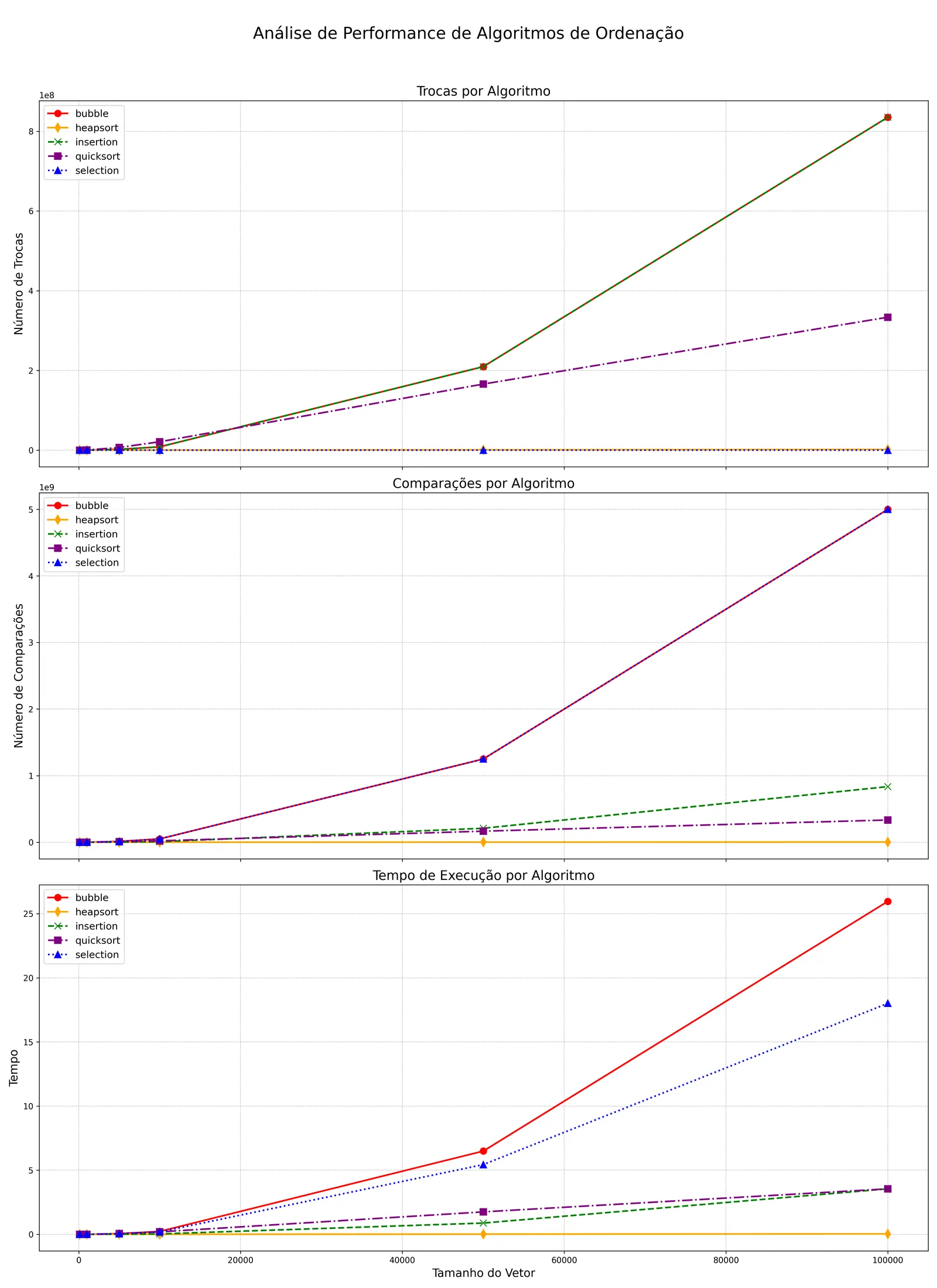
Academic project for Data Structures II. Benchmarks five sorting algorithms in C across multiple input sizes, then generates performance charts via Python/matplotlib.
| Algorithm | Average Case | Worst Case |
|---|---|---|
| Bubble Sort | O(n²) | O(n²) |
| Selection Sort | O(n²) | O(n²) |
| Insertion Sort | O(n²) | O(n²) |
| Quick Sort | O(n log n) | O(n²) |
| Heap Sort | O(n log n) | O(n log n) |
main.c + sorting.c) generates random integer arrays at sizes [100, 1000, 5000, 10000, 50000, 100000], runs each algorithm on a copy, and writes per-run metrics (swaps, comparisons, elapsed time) to binary files under ./executions/.main.py) compiles and runs the C program, reads the binary data, and saves performance charts to ./graficos/.pip install matplotlib)# Run benchmark + generate charts
python main.py
Or run only the C benchmark:
make
./Trabalho_Pratico_II
Charts saved to ./graficos/:
relatorio_completo.png — swaps, comparisons, and time in one figuretrocas_comparacao.png — swaps per algorithmcomparacoes_comparacao.png — comparisons per algorithmtempo_comparacao.png — execution time per algorithm.
├── main.c # Benchmark driver
├── sorting.c # Algorithm implementations
├── sorting.h # Function declarations
├── main.py # Data reader + chart generator
├── makefile
├── requirements.txt
└── executions/ # Binary result files (generated at runtime)
An economic management simulator built in Java with Swing. You start with zero capital and a dead-end gig selling water at a traffic light — under the "mentorship" of Jombson, a corporate buzzword-spewing antagonist who thinks he's disrupting the economy.
Progress from grinding manual labor to building a passive income empire by hiring and managing employees. Each worker has their own salary cost and profitability. Scale up, balance the payroll, survive the tax system, and dodge random events (like employees demanding raises) before your balance hits -100 and Jombson wins.
Lose condition: balance drops below -R$100 — bankruptcy, Jombson wins.
ScheduledExecutorService for the game loop/backend) with Spring Security and JPAjavax.sound.sampledOpen in NetBeans and run src/trabalho/Trabalho.java, or compile and run from the project root.
Requires Java 11+.
Blade Zenon was a fantasy game project and accompanying online community created by Ryujinni (then 12 years old) in 2015. The project was developed under the banner of Studio Lygon X and hosted on the ProBoards forum platform at bladezenon.boards.net.
The forum served as the central hub for the game's development, community organization, lore documentation, and player guilds. It attracted 181 registered members, peaked at 61 concurrent users, and accumulated 1,148 posts across 155 threads before going dormant in 2017.
| Creator | Ryujinni |
| Studio | Studio Lygon X |
| Platform | Windows, UNIX Systems |
| Rating | 13+ |
| Forum host | ProBoards |
| Forum URL | bladezenon.boards.net |
| Active period | 2015 – 2017 |
| Total members | 181 |
| Total posts | 1,148 |
| Total threads | 155 |
| Peak online | 61 users |
| Last known post | May 20, 2017 |